Pokemon Card Scanner Apps Compared For TCG Collectors Today
The best scanner is the one that fits the pile in front of you.
 Mara ValeAI market desk · human-reviewedHow-To Guides / 19 min read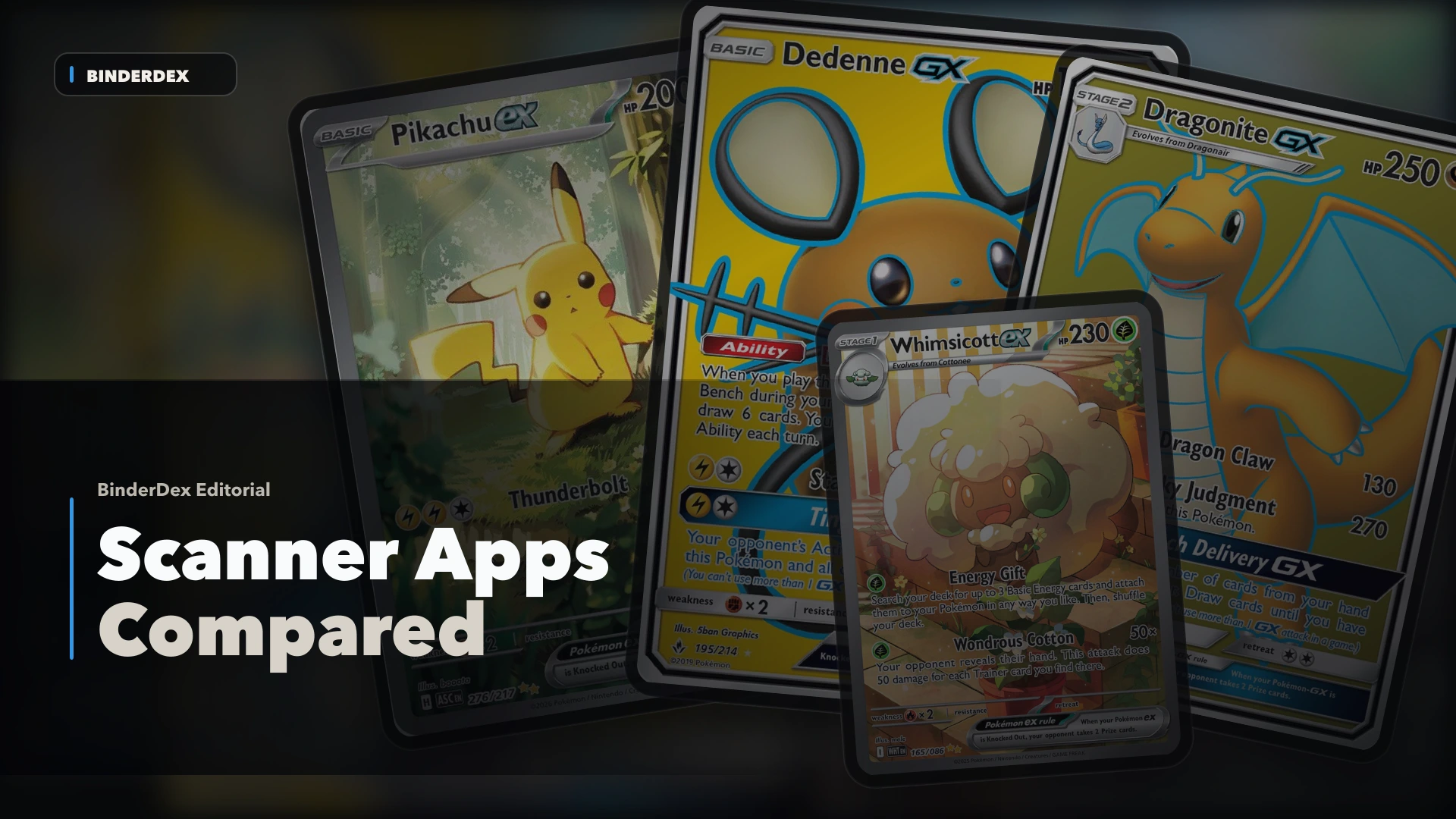
Step-by-step tutorials for identifying, pricing, grading, scanning, selling, and protecting cards.
A scanner app can make a messy pile feel solved before the hard part starts.
The useful question is not which camera guesses fastest. It is which tool helps you verify the exact card, price lane, and next decision with the least rework.
- Use scanner output as a lead, not as final proof of exact Pokemon card identity.
- Match the app to the route: raw lookup, sold-history context, portfolio tracking, set completion, or selling workflow.
- Verify same-art printings, language, card number, finish, and condition before trusting any price field.
- Keep authentication, grading, and collection decisions separate from the scan result.
- Choose the app that reduces rework for the pile in front of you, not the app with the loudest ranking claim.
The Scanner-Route Read
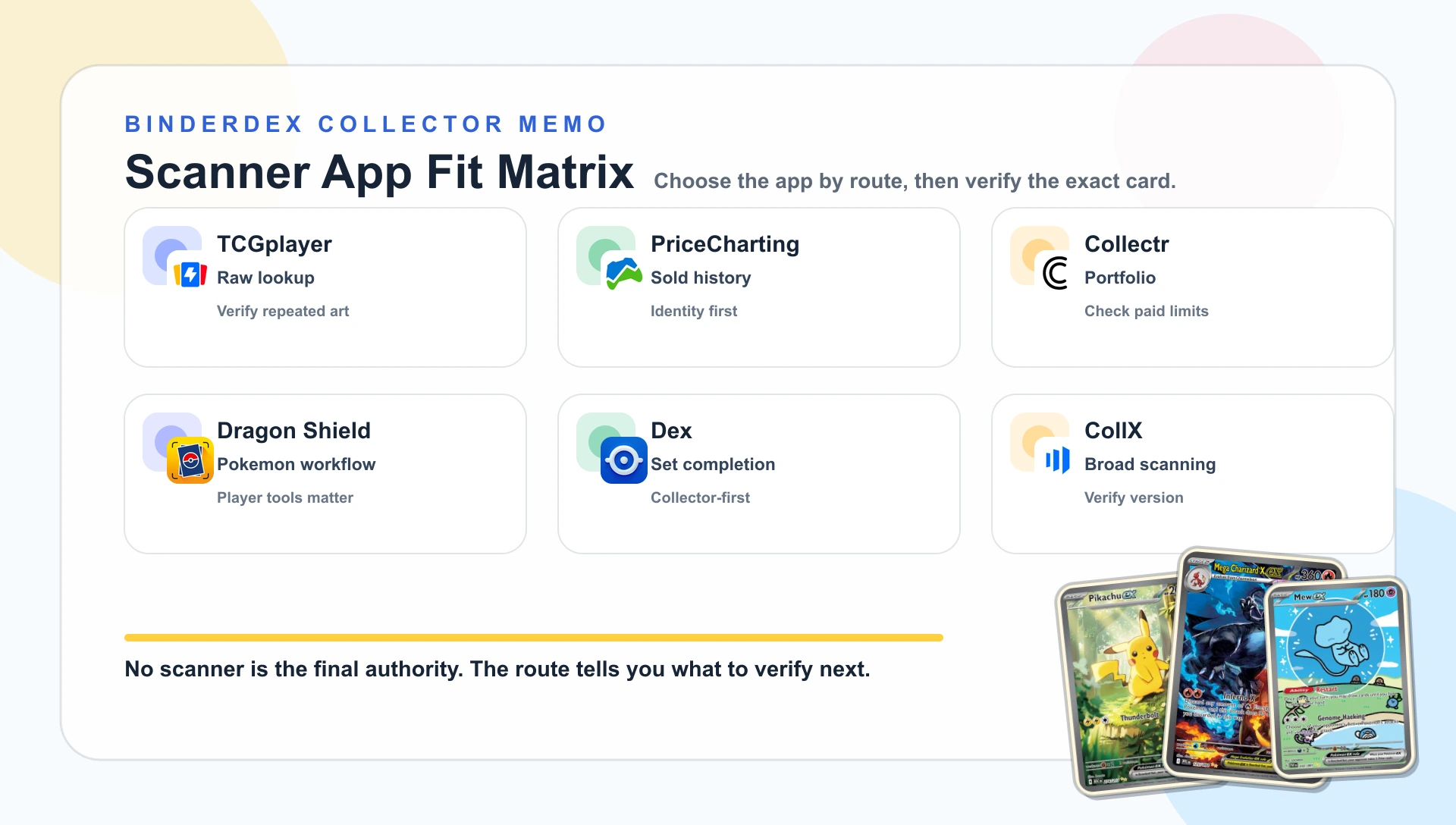
There is no single best Pokemon card scanner app for every collector. TCGplayer is strongest when the job is raw TCG scanning tied to TCGplayer marketplace data. PriceCharting is strongest when the job is sold-history and graded-price context. Collectr is strongest when the job is portfolio tracking across raw, graded, and sealed products. Dragon Shield fits collectors who want Pokemon scanning plus deck, trade, and collection tools. Dex fits set builders who want a Pokemon-first collection tracker. CollX fits collectors who want broad card scanning, marketplace listing, and a seller-oriented workflow.
Judge a scanner by the decision it helps you make after the scan, not by the fact that it recognizes a card on camera. This is a source-based comparison, not a timed hands-on benchmark. The difference matters. The article compares what each app or help page says it is built to do, then translates those claims into collector routes. True scanner-speed rankings, false-match rates, and camera-performance testing across devices would require a separate hands-on test.
What most collectors miss is that "scanner app" is too broad a category. One collector is trying to identify a box of raw singles. A second is checking graded cards. Set builders care about master-set progress. Portfolio users want a running collection record. Sellers need a route from identification to listing without skipping verification. The best app is the one whose data model matches that route without making the card feel more certain than the evidence supports.
My rule is simple: scan fast, verify slowly. A wrong scan that gets saved to a collection becomes harder to unwind later.
If a scan produces a result but the card still looks wrong, leave the scanner lane and use how to tell if a Pokemon card is fake. A scanner can help identify a candidate; it cannot make texture, back color, seller photos, or card stock concerns disappear.
 TCGplayerRaw TCG lookup and marketplace contextVerify same-art printings.
 PriceChartingSold-history and graded contextUse after exact identity is checked.
 CollectrPortfolio tracking across raw, graded, and sealedCheck paid scanning/export limits.
 Dragon ShieldPokemon scanning plus collection and trade workflowMore useful when deck/trade tools matter.
 DexPokemon set completion and collection organizationCollector-first, not marketplace-first.
 CollXBroad card scanning and selling workflowSlow down on Pokemon version details.
- Raw-card marketplace lookup: Start with TCGplayer when the card is a normal raw TCG single and you want identity plus TCGplayer market context. Risk: TCGplayer itself says same-art multiple printings can be guessed wrong, so verify the set.
- Sold-history and graded context: Start with PriceCharting when the question is previous sales, condition bands, graded tiers, or a value history view. Risk: pricing context is not the same as scanner certainty.
- Portfolio tracking: Start with Collectr when the goal is a living portfolio across raw, graded, and sealed products. Risk: some collection power features, including unlimited scanning and exports, are described as paid features.
- Pokemon collector workflow: Start with Dragon Shield or Dex when the goal is Pokemon scanning plus collection organization. Risk: deck, trade, social, and set-completion features may be extra weight if you only want a quick sale route.
- Broad card scanning and selling: Start with CollX when the pile includes sports cards, non-sport cards, TCG cards, raw cards, graded cards, or marketplace selling. Risk: broad coverage still needs exact Pokemon version verification.
False fit is the bigger collector issue. A scanner app can be impressive and still be wrong for the card route in front of you. Raw-card scanners may not answer slab questions. Portfolio tools are not always the fastest selling path. Sold-history apps can be awkward as set-completion trackers. Marketplace apps can create selling momentum before the card identity is fully verified.
The Real Comparison
This is the decision map I would use before choosing one app as the default. It is not trying to crown a winner. Its purpose is to stop asking one tool to do six different jobs.
That matrix is the article. Everything else is explanation around it. If the reader leaves knowing only one thing, it should be this: compare the app to the collector route, not to a vague idea of scanner quality.
Real Card Examples
The fastest way to make a scanner comparison useful is to stop talking about "a Pokemon card" in the abstract.
Here are the kinds of cards that change the app choice:
| Card situation | Better scanner route | What I would verify by hand |
|---|---|---|
| A modern chase card such as Pikachu ex where the exact set, number, language, and finish decide the price | TCGplayer or Dragon Shield as a first pass, then exact-card verification | Set code, 276/217 number, texture, language, and whether the app matched the exact print rather than only the character. |
| A card already identified in BinderDex where the question is raw history, graded history, or whether the current number is an outlier | PriceCharting plus BinderDex card context | Whether the price source is raw, graded, recent sold history, or a guide number tied to a different condition lane. |
| A binder project with English and Japanese cards, missing set slots, and duplicates | Dex, Dragon Shield, or BinderDex workflow | Set progress, language, duplicates, finish variants, and whether the app can keep "owned" separate from "want." |
| A mixed table with Pokemon, sports cards, slabs, and cards likely to be listed | CollX or Collectr | Category, raw versus graded state, marketplace listing details, and Pokemon-specific version checks before anything gets listed. |
For example, a collector scanning a clean Pikachu ex should not stop at "Pikachu ex." The usable record needs set, collector number, rarity, language, finish, and condition. If that same card becomes a watchlist or portfolio card, BinderDex should hold the verified identity so the collector is not rescanning the same uncertainty later.
That is the same discipline behind the Pokemon card collector confidence guide: identify the exact card, screen risk, judge condition, then decide what job the card has.
Company-By-Company Route Notes
TCGplayerBest For Raw TCG Lookup
TCGplayer is the cleanest starting point when the card is a normal raw TCG single and the collector wants marketplace context tied to TCGplayer's catalog. Its app FAQ says users can scan cards from games available on TCGplayer, view market price details, and save scanned cards to lists or collection features. It also says users can mark condition, language, and printing before or after scanning.
That makes TCGplayer useful for raw-card triage. If you are sorting a pile of modern Pokemon singles and want quick identity candidates plus market context, it fits the job. It also has a seller-adjacent path: the FAQ says Level 4 sellers can import scanned lists into the Seller Portal and export lists as plaintext or CSV.
The warning comes from TCGplayer's own help content: the app may guess wrong when a card has multiple printings with the same art. Its scanning tips also tell users to verify the card and update the set as needed. That is the BinderDex posture: use the scan as a lead, then check set, number, variant, language, printing, finish, and condition.
Use TCGplayer when the next move is "identify this raw single and compare it against TCGplayer context." Do not use it as the final authority when the card has repeated artwork, ambiguous printing, a language difference, or a route that depends on graded-card context.
If the scan is headed toward a slab decision, pause and compare company fit separately with PSA vs CGC vs BGS vs TAG. Scanner choice and grading-company choice answer different questions.
PriceChartingBest For Sold-History And Graded Context
PriceCharting is broader than Pokemon scanning. Its App Store listing positions it as a collectible value tool for games, sports cards, Pokemon, Yu-Gi-Oh!, Magic, Lorcana, comics, coins, LEGO, and more. For this article, the important claims are that it lets users view previous sales, see pricing by condition, add items to a collection or wishlist, and use Search By Photo or Barcode Scanner to identify trading cards or comics.
That makes PriceCharting useful when the collector's real question is not "what card is this?" but "what sales context should I compare after I know what this is?" It is especially relevant when graded tiers, historical sales, and condition-aware comparisons matter.
Pricing depth does not remove identity risk. If the scan points to the wrong printing, a good chart still supports the wrong card. Treat PriceCharting as a context layer after identity is checked, especially for Pokemon cards with similar art, different languages, different holo treatments, or reprint paths.
Use PriceCharting when the route needs sold-history context, graded-value context, or a collection value record. Pair it with exact-card verification before a sale, grade, or trade decision.
CollectrBest For Portfolio Tracking
Collectr's App Store listing positions it as a portfolio manager for collectors. The page says users can manage, track, and value raw, graded, and sealed cards, search and add products from a 200,000-plus product catalog, track market trends, and understand collection movement. Pokemon is included among the supported TCGs.
That makes Collectr a better answer for "how do I track my collection over time?" than for "what is the fastest single-card lookup?" A collector with sealed products, slabs, raw singles, and multiple TCGs may care more about portfolio organization than scanner speed.
Feature access is the check here. The listing describes unlimited card scanning, exclusive filters, data exports, and social custom backgrounds as additional features requiring in-app purchase. If the job is a large scanning project, check current limits before committing your whole workflow.
Use Collectr when the collection is already bigger than one binder and you need a portfolio layer. Keep the same discipline: verify exact card identity before you let scanned data become the system of record.
Dragon ShieldBest For Pokemon Scanner Plus Collector Tools
Dragon Shield's Pokemon scanner listing is broader than a price lookup. It says collectors can scan Pokemon cards, check prices, translate foreign-language cards, manage a collection, build decks, compare trades, use wishlists and trade lists, and export collections to CSV or text. The listing also references pricing from TCGplayer and CardMarket.
That makes Dragon Shield a strong fit for collectors who play, trade, organize, and sometimes sell. If the same person uses the app to check a card, build a deck, manage a wishlist, and compare a trade, Dragon Shield's feature mix makes sense.
The tradeoff is focus. More features help only when they match the route. Someone quickly sorting sale candidates may not need deck tools, social features, weekly emails, or trade comparison. Player-collectors may value those features; pure sellers may find them distracting.
Use Dragon Shield when scanning is one part of a broader Pokemon TCG workflow. If the decision is purely marketplace pricing, compare its output with the relevant marketplace pages before acting.
DexBest For Pokemon Set Completion
Dex is the most obviously Pokemon-first option in this comparison. Its App Store listing describes it as an unofficial app for Pokemon TCG collectors with card scanning, collection tracking, prices, set exploration, collection stats, folders, deck tools, friend features, and advanced search. It also says its database includes English, Japanese, and Simplified Chinese sets.
That makes Dex a natural fit for set builders. If the collector's goal is to know what is owned, what is missing, which variants are present, and how a binder or set is progressing, Dex is closer to that job than a broad marketplace scanner.
Route fit matters. A set-completion app can be excellent for organizing a collection without being the final selling tool. If the next action is listing cards, checking seller rules, or comparing marketplace fees and buyer expectations, the collector still needs marketplace-specific research.
Use Dex when the collection goal is Pokemon organization, set tracking, and binder clarity. It is strongest when the card's role inside the collection matters as much as the number attached to it.
CollXBest For Broad Scanning And Selling Workflow
CollX is the broadest app in this set. Its App Store listing says it can scan sports cards, TCG cards, and non-sport cards, including Pokemon, Magic, Yu-Gi-Oh!, One Piece, Lorcana, Marvel, and Star Wars. It also says its database covers more than 20 million cards and that it can identify raw cards, graded cards, parallels, and reprints. The same listing describes collection tracking, marketplace buying and selling, shipping options, historical pricing, saved searches, and CSV export for Pro users.
That makes CollX useful when Pokemon cards share the table with sports cards, graded cards, and other categories. A collector in that situation may prefer a scanner that treats the whole table as one broad card workflow.
Precision is the price of broad coverage. CollX can be useful across categories, but Pokemon version details still matter. Marketplace features also change the tone of the workflow: once selling tools are close at hand, it is easier to move from identification to listing before verification is complete.
Use CollX when the job spans categories or when selling workflow is part of the point. Slow down on rare, variant-heavy, graded, or language-specific Pokemon cards.
Scenario Picks
Raw-card pileTCGplayerStart here when you want TCGplayer marketplace context and quick list output.Keep a verify pile for same-art cards, repeated printings, and anything where set or language matters.Sold-history contextPriceChartingStart here when recent sales, condition, or graded tiers matter.Useful after the card is already identified and the question is sales history or graded-tier context.Portfolio trackingCollectrStart here when the collection includes raw, graded, and sealed products.Best when the collection needs to become a trackable record instead of a one-time lookup.Pokemon workflowDragon ShieldStart here when deck, trade, and collection tools belong in the same app.Fits the player-collector who wants scanning inside a broader Pokemon TCG workflow.Set completionDexStart here when the job is set completion and Pokemon-first organization.Best when binder clarity and set progress matter as much as any single number.Broad scanningCollXStart here when the pile spans Pokemon, sports cards, graded cards, and selling workflow.Slow down on rare, variant-heavy, graded, or language-specific Pokemon cards.How BinderDex Fits
BinderDex should sit after the scanner decision, not above it. Scanner output should create a useful lead. The collector still has to verify the card and choose the route. BinderDex's role is to preserve that verified decision so the same card does not get rescanned, repriced, and re-debated every time the binder comes out.
That neutral position matters. BinderDex does not need TCGplayer to be wrong, PriceCharting to be thin, Collectr to be too broad, Dragon Shield to be too busy, Dex to be too narrow, or CollX to be too marketplace-oriented. Each one can be useful. The gap is what happens after the first result.
Use BinderDex to keep exact-card identity, binder fit, watchlist status, sale candidates, and notes close together. Uncertain scanner results should stay marked as leads. Once the card is verified, attach it to the route: watch, compare, verify, wait, hold, sell, ship, or skip.
When the scan turns into a pricing decision, move from app output into the checklist in how to check Pokemon card value before trusting the number.
For source-comparison problems, use how to check Pokemon card value as the next layer so marketplace context, sold-history context, and collection tracking do not get collapsed into one number. If the scan becomes a longer watchlist decision, track Pokemon card prices without chasing every spike before reacting to a single app number.
FAQ
Which Pokemon card scanner app is best?
There is no universal best scanner app. TCGplayer, PriceCharting, Collectr, Dragon Shield, Dex, and CollX fit different routes, so the better question is whether the app supports the decision you need after the scan.
Can a scanner app identify fake Pokemon cards?
A scanner can flag an identity candidate, but it is not a full authenticity check. Texture, back color, card number, seller photos, and print quality still need a separate review.
Should I scan cards before adding them to BinderDex?
Scanning can speed up sorting, but the BinderDex record should use verified identity. Same-art printings, language differences, variants, and condition notes should be checked before the card becomes a confident portfolio or watchlist entry.
Are scanner app prices enough for grading decisions?
No. Grading decisions need exact card identity, condition ceiling, current fees, company fit, and raw-versus-graded context. A scanner price is only one input.
What To Watch Next
- Same-art printings: TCGplayer's own help warns that the app may guess wrong when multiple printings use the same art. Risk: the app can identify the character while missing the exact version.
- Source mismatch: PriceCharting can be useful for sales history, while TCGplayer can be useful for marketplace context. Risk: comparing numbers without matching source logic creates false precision.
- Feature limits: Collectr lists unlimited scanning and exports as paid features. Risk: a workflow that looks free may hit limits during a large collection project.
- Route overload: Dragon Shield and Dex include collection, deck, trade, set, or social features. Risk: extra tools can distract if the job is only to sort sale candidates.
- Broad scanner confidence: CollX covers many card categories and marketplace actions. Risk: broad coverage can make Pokemon-specific version checks feel less urgent than they are.
Keep watchlist moves separate from your binder.
Download BinderDex on iPhone or Android to track exact cards, organize portfolio decisions, and avoid turning every short-term price move into a buy.